Concepts
AtomVoxelizer stores atom-centered information on a periodic 3D grid. The core
object is VoxelGrid: it holds a simulation cell, a grid shape, and a NumPy
array of voxel values. You can choose the grid by target real-space
resolution or by explicit gpts.
How Sphere Painting Works
Most operations paint a sphere around each atom:
Convert an atom position to fractional coordinates and wrap it into the primary periodic cell.
Convert that position to a voxel index.
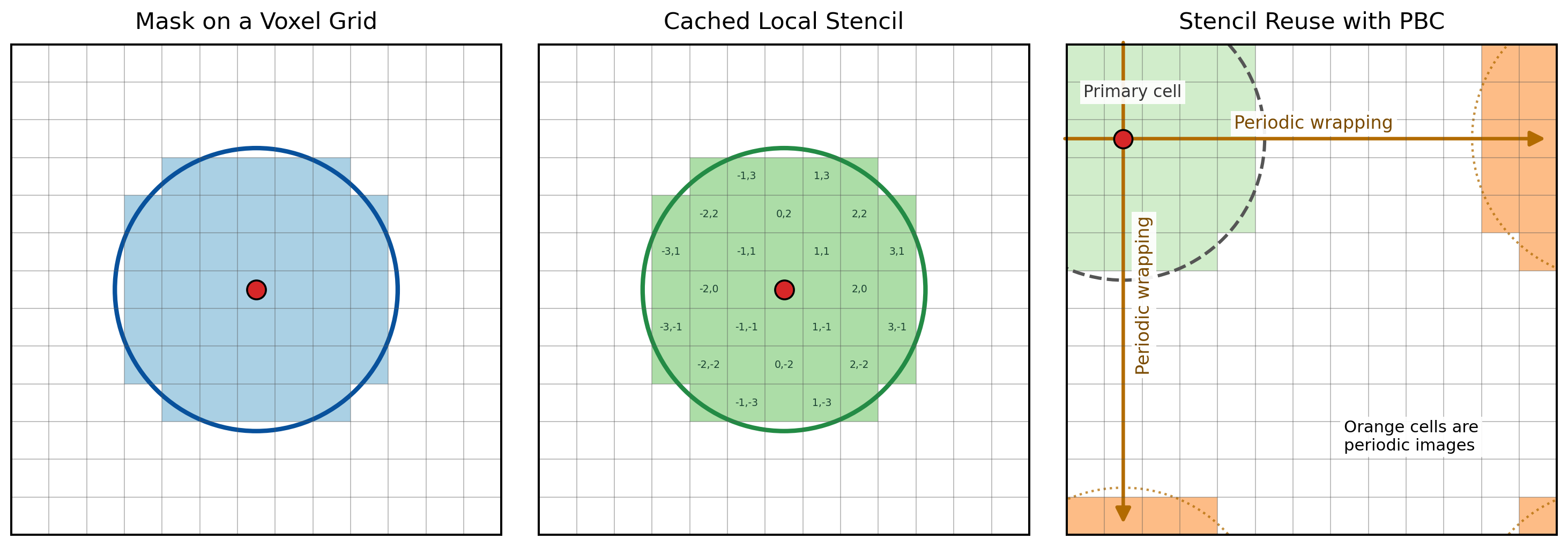
Reuse a cached list of integer voxel offsets inside the requested radius.
Add those offsets to the atom-center voxel and wrap by the grid shape.
Modify only the selected local voxels.
This avoids the expensive alternative of scanning every voxel against every
atom. A direct distance scan is typically O(N_atoms * N_voxels).
AtomVoxelizer instead loops over atoms and visits only the local stencil around
each atom. For fixed radius and resolution, that stencil size is roughly
constant, so sphere painting scales approximately as O(N_atoms).
The same idea is shown below in two dimensions. A sphere mask selects local voxel centers, the selected offsets are cached as a stencil, and the stencil is reused for later atoms. When offsets leave the primary cell, periodic wrapping places those cells on the opposite side of the grid.
Sphere Operations And Masks
The scalar grid API uses explicit operations:
set_sphere/set_spheresWrite values into a sphere.
add_sphere/add_spheresAdd values into a sphere. This is useful for shell-overlap or coordination masks.
mul_sphere/div_sphereMultiply or divide selected voxels.
min_sphere/min_spheresKeep the minimum of the existing grid value and the mask value. This is commonly used with
mask="distance"to build nearest-atom distance fields.
Two scalar mask types are available:
constantEvery voxel in the sphere receives the supplied value or factor.
distanceEvery voxel receives its real-space distance from the sphere center. The distance is in Angstrom when the cell is in Angstrom.
Grid Values And Dtypes
The default grid dtype is numpy.float32. Pass dtype=... when another
numeric storage type is useful:
grid = VoxelGrid(cell, resolution=0.25, dtype=np.int16)
Integer dtypes are useful for count-like masks. Floating dtypes are appropriate
for distance fields and analysis workflows. Complex dtypes support arithmetic
sphere operations, but ordered operations such as min_sphere,
clamp_grid, and value-range sampling are not defined for complex grids.
Backends
VoxelGrid is the default NumPy backend and is always available.
VoxelGridNumPy is an alias for callers that want an explicit backend name.
VoxelGridNumba uses Numba-compiled loops for the hot sphere-painting
operations. It is usually the fastest CPU backend for repeated sphere updates.
Install Numba directly when you want this backend:
pip install numba
VoxelGridCuPy stores the grid on a CUDA device with CuPy. It can be useful
for large GPU-resident workflows, but small atom-by-atom updates may be slower
than CPU backends because of data movement and kernel-launch overhead. Install
the CuPy package matching your CUDA runtime, for example:
pip install cupy-cuda12x
VoxelGridTaichi and VoxelGridTaichiGPU are experimental Taichi CPU/GPU
backends. They are included for experimentation, but the current CPU Taichi
backend is not expected to outperform NumPy or Numba for small sphere-update
workloads:
pip install taichi
Run the CPU mask-generation benchmark with:
python benchmarks/benchmark_backends.py --workloads zeolite nanoparticle surface \
    --plot mask_generation_scaling.png
This benchmark compares a simple direct atom-grid distance scan with
VoxelGrid NumPy and VoxelGridNumba from small models to roughly 3000
atoms for zeolite, nanoparticle, and surface workloads. CuPy and Taichi remain
experimental backends, but they are not emphasized in the default benchmark
because current atom-by-atom GPU updates are generally not competitive for
these workloads.
Field Voxel Grids
FieldVoxelGrid stores scalar, vector, or matrix-valued data at each voxel.
Its array shape is (*gpts, *value_shape). VectorVoxelGrid is a
convenience alias for value_shape=(3,).
from atomvoxelizer import FieldVoxelGrid, VectorVoxelGrid

scalar = FieldVoxelGrid(cell, resolution=0.25, value_shape=())
vector = VectorVoxelGrid(cell, resolution=0.25)
matrix = FieldVoxelGrid(cell, resolution=0.25, value_shape=(3, 3))
For vector fields, mask="normal" writes a unit vector pointing away from
the atom-center voxel. Summing normal masks over atoms and then normalizing the
nonzero vectors gives a local direction field near a surface:
grid = VectorVoxelGrid(cell, resolution=0.25)
grid.add_spheres(atom_positions, radii, mask="normal")
grid.normalize_vectors()
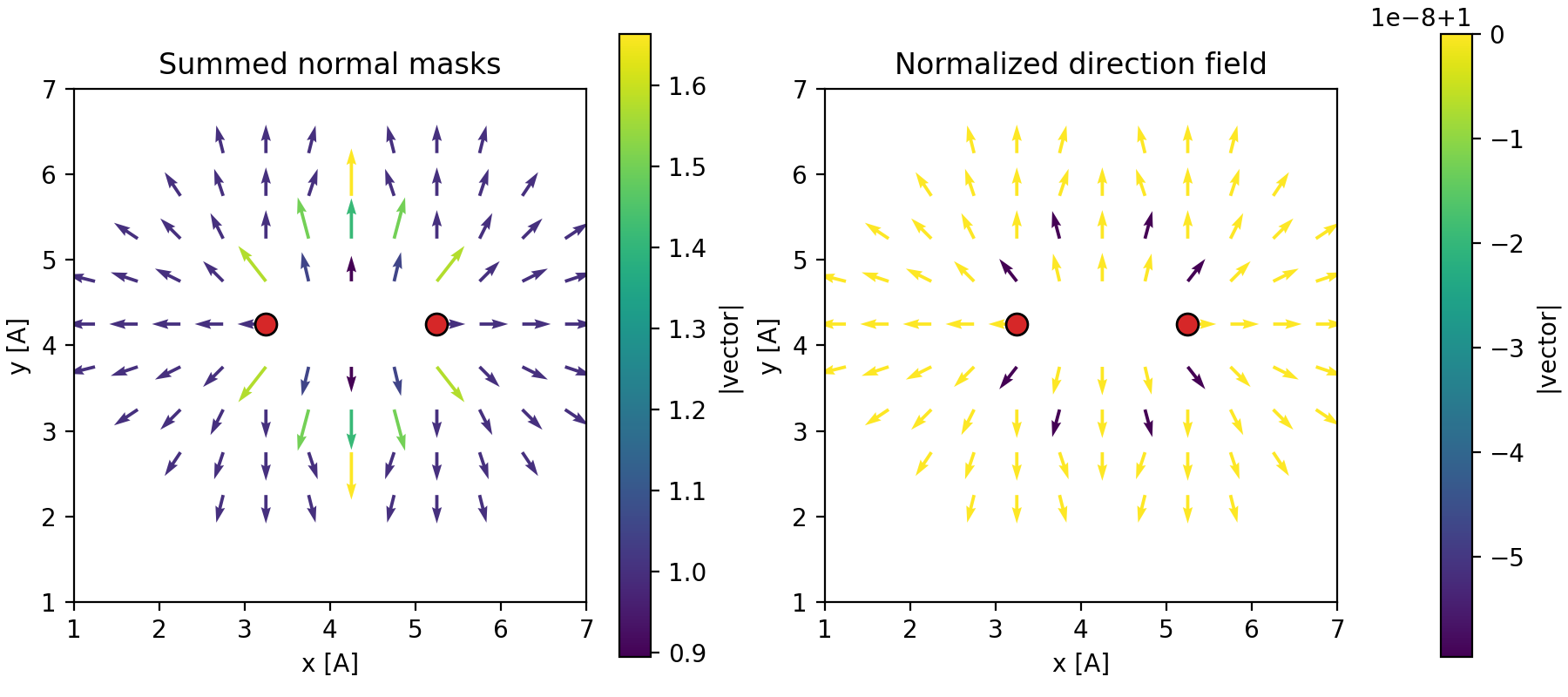
Vector fields can be inspected with Matplotlib:
grid.plot_quiver_slice(axis="z", index=grid.gpts[2] // 2, stride=2)
grid.plot_quiver_3D(stride=3, min_norm=0.1, length=0.5)
Periodic Surfaces
VoxelGridAnalysis.mesh_at_value traces scalar-field surfaces with marching
cubes. For periodic grids, AtomVoxelizer tiles the field, keeps triangles
associated with the central periodic image, and clips boundary-crossing
triangles to the primary cell. Clipping avoids long triangles that would appear
if vertices were simply wrapped back into the cell.
For binary masks, surface_area_voxel_faces counts selected/unselected voxel
face boundaries directly. It is much faster for fine convergence scans, but it
returns a grid-aligned surface estimate rather than a smoothed triangular mesh.
Dtype Benchmark Note
On an AMD EPYC 7551P CPU with Python 3.12.12 and NumPy 2.4.1, a small BEA
zeolite dtype benchmark at --resolution 0.5 --repeats 2 showed little NumPy
wall-time sensitivity to dtype. Memory use changed predictably with item size.
Larger grids and memory-bound workloads may show stronger dtype effects.
Run the dtype benchmark with:
python benchmarks/benchmark_dtypes.py --backend numpy
python benchmarks/benchmark_dtypes.py --backend numba